
How to Replace the EveryDrop Filter 2 (EDR2RXD1 / W10413645A) and Reset the Filter Light

Replacing the EveryDrop Filter 2 (EDR2RXD1) takes about five minutes, needs no tools, and is the single best thing you can do for the taste of your water and ice. This guide covers finding the filter, removing the old cartridge, fitting the new one, flushing it correctly, and resetting the filter light so the reminder works for the next six months.
First, confirm Filter 2 is your filter
- Model numbers: EDR2RXD1 is also listed as W10413645, W10413645A and 9082 (Kenmore owners: 46-9082).
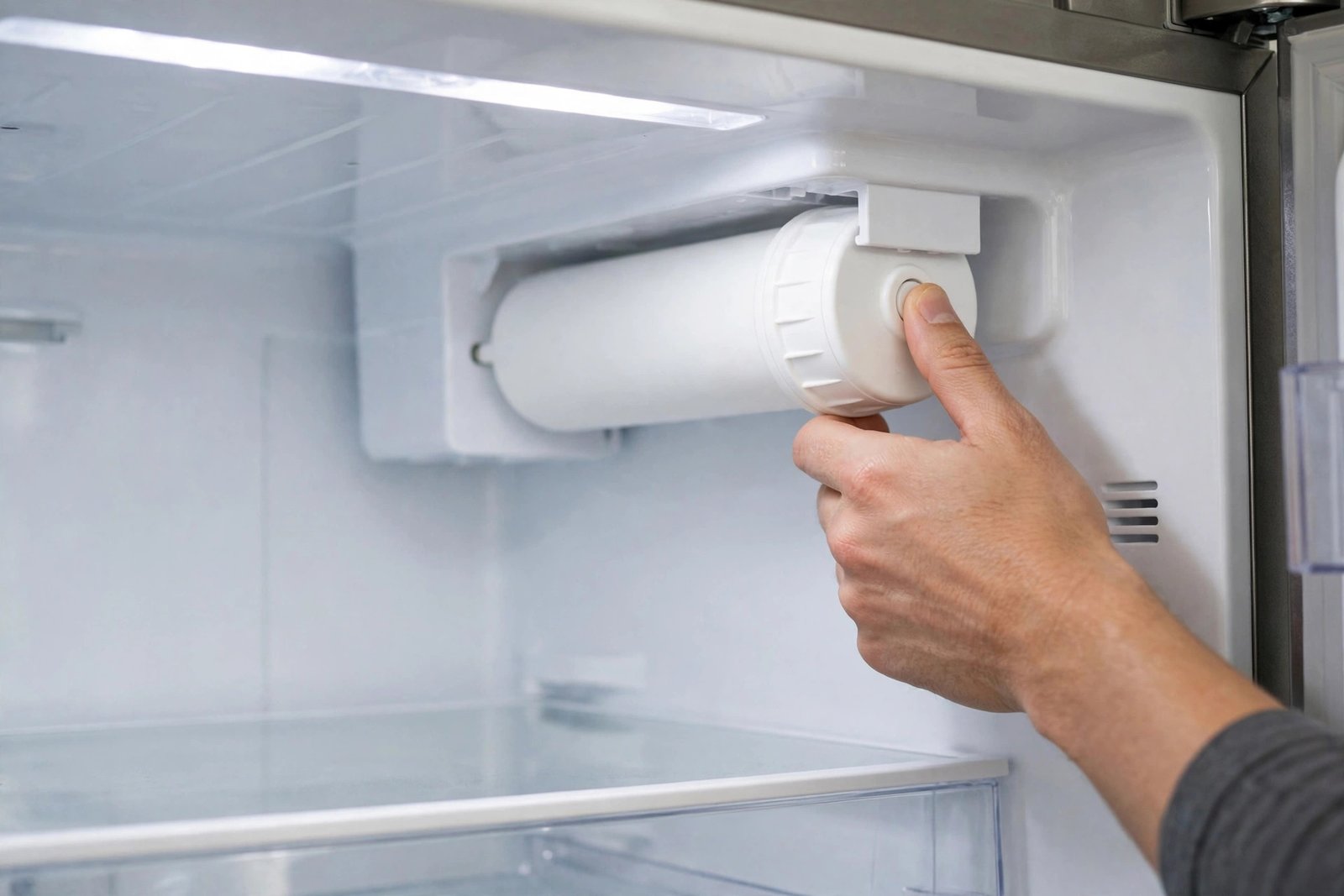
- Location: on the fridges this filter fits, the cartridge sits in the upper-right interior compartment and releases with a push button.
- Brands: select Whirlpool, Maytag, Amana, KitchenAid, JennAir and Kenmore refrigerators.
- If your filter is in the base grille instead, you most likely need Filter 3 — start with EDR3RXD1 vs EDR4RXD1 before you order.
At a glance: Time about 5 minutes, plus flushing. You may need a large pitcher and a towel. Change interval: every 6 months or 200 gallons.
Step 1: Find the filter compartment
Open the fresh-food door and look in the upper-right interior of the fridge. The Filter 2 housing sits there behind a small cover or door on most models that use this cartridge.
Step 2: Release the old cartridge
Press the push-button release for the compartment and ease the old cartridge out. A small amount of water may drip — that is normal, and the housing’s built-in shut-off stops the flow once the cartridge is out. No water shut-off valve needs turning off.
Step 3: Prepare the new filter
Remove the protective cap/cover from the new EDR2RXD1. Keep the cartridge upright and do not force anything.
Step 4: Fit the new cartridge
Slide the new filter into the compartment and push until it is fully seated and the release button/cover closes properly. A half-seated filter is the most common cause of slow flow straight after a change, so give it one firm final push.
Step 5: Flush the system (do not skip this)
- Run the water dispenser and discard about 2–3 gallons of water (roughly 3–4 minutes, in 30-second bursts).
- The water may look cloudy or sputter at first — that is trapped air, and it clears as you flush.
- Discard the first batch of ice as well.
Step 6: Reset the filter light
- On most Whirlpool-family models, press and hold the “Water Filter” or “Filter Reset” button for 3 seconds until the indicator turns green or resets.
- On models without a dedicated button, the reset is a dispenser-control combination specific to the model — check your manual.
If something seems wrong
- Water flow is slow: filter usually not fully seated. Re-seat and flush another gallon.
- The light will not reset: hold reset a full 3 seconds with door closed; if still red, re-seat filter then reset again.
- Water tastes odd for a day: flush another gallon; new carbon can affect taste briefly.
What a genuine Filter 2 costs
Replace every 6 months or 200 gallons. One genuine filter costs $39.99 here with free US shipping — versus $59.99 at the official brand store — and multi-packs (up to $147.99) mean the next change is already in the cupboard. Yearly maths: genuine fridge filter cost per year
Need the filter? Shop the genuine EveryDrop EDR2RXD1 (Filter 2) — $39.99, free US shipping, 30-day free returns.
Still not sure which filter your fridge takes? See The Complete EveryDrop Buying Guide: Filters 1, 2, 3, 4, 5 and A in One Table — find your old part number in the table and you are done in 2 minutes.
FAQ
How do I know my fridge takes Filter 2? Check part number on cartridge: EDR2RXD1, W10413645, W10413645A or 9082 / 46-9082 means Filter 2.
How much water do I flush? About 2–3 gallons, discard first ice.
How often? About 6 months or 200 gallons.
Do I need to turn water off? No.